What does a POS system do in a repair shop?
A POS system for an auto repair shop is the software that handles your sales, payments, and repair records in one place. It rings up parts and labor, adds the right sales tax, records how the customer paid, and keeps a history for each customer and car. This guide explains what to look for, what it costs, and how to choose with confidence.
POS means point of sale — where a customer pays. In a store, that is a simple scan and swipe. In a repair shop, the sale is bigger and slower. A customer drops off a car, you inspect it, you send a quote, and you do the work. Payment happens at the end. A good POS system for an auto repair shop follows that whole path. It keeps the quote, the parts, the labor time, and the final bill together. Nobody has to retype anything.
Why a store POS is not enough
Many shops start with a payment app or a retail till. It works for taking cards, but it leaves gaps: it does not link a sale to a vehicle or license plate; it does not track parts stock when you sell or install a part; it does not handle quotes and approvals; it does not give you a service history to show a returning customer.
You end up using a notebook or spreadsheet beside the till. That is where mistakes begin. Payment-first tools (Square, Clover, SumUp, SpotOn) and full suites (AutoLeap, Shopmonkey, Tekmetric) all rank for this search. Your opening as a garage-specific cart is simplicity, published USD pricing, and a free trial — not matching their payment networks or review volume yet.
Must-have features in a POS system for an auto repair shop
Parts and labor on one bill — clear totals for the customer. Repair orders and estimates — quotes, approvals, and work in one record. Live parts stock — fewer “we thought we had it” moments (on inventory plans). Customer and vehicle history — faster quotes and better service. Sales tax settings — correct tax on each sale from the rate you set. Printed invoices — a clean record for every sale. Reports on higher plans — sales, parts, and labor at a glance. Easy staff training — cashiers learn it in a day, not a month.
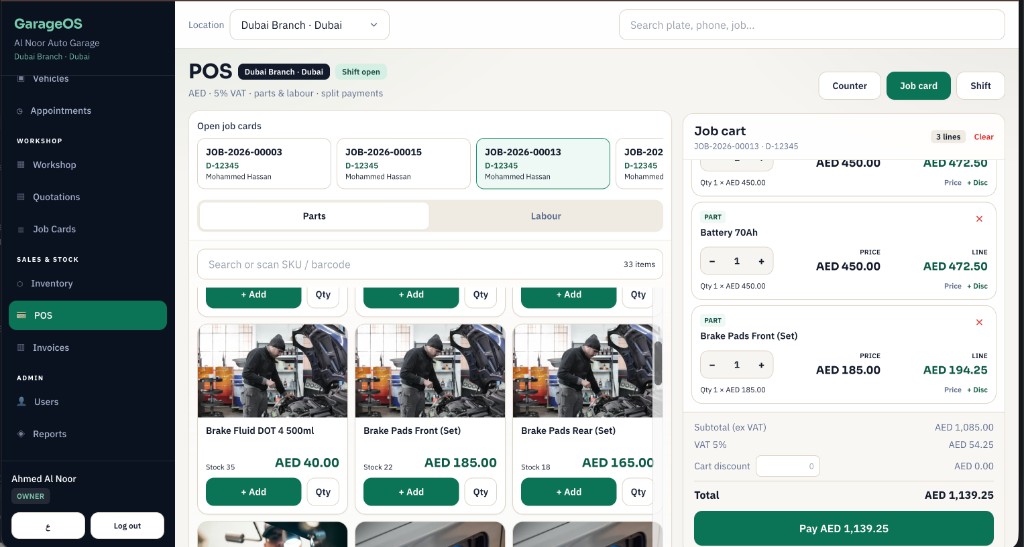
GarageFlow POS covers Counter POS and Job POS (open by plate), estimates that become repair orders, garage-set sales tax and currency, and inventory on Professional. It records cash or card as the payment type; it does not process cards through an EMV reader or set card rates. It does not sync QuickBooks.
Sales tax: the part everyone forgets
Sales tax in the United States is set by each state and often by the city or county too. Some states tax parts but not labor. Some tax both. Rates can also change. Your POS should let you set your own rate so you are not stuck on a template from another country.
Ask your accountant how your state treats repair labor, then test one sale in your system before you go live. A wrong tax setting is easy to fix on day one and painful after a year of invoices.
How much does it cost?
Costs fall into three groups. Software fee: most cloud systems charge monthly. Plans often range from under $100 to several hundred dollars depending on features and staff — GarageFlow Starter is USD 149/month after a 14-day free trial with no card; Professional and Business are higher on the pricing page. Payment fees: if you use a separate card processor, those fees are a percentage plus a fixed amount and sit outside the software. Hardware: a computer or tablet, a receipt printer, an optional barcode scanner, and a card reader if you process cards elsewhere.
Always confirm current prices on each vendor’s page. Check for setup fees, contract length, and what happens if you cancel. Cloud software runs in the browser with vendor backups; on-premise lives on one shop PC and you handle updates yourself. Most small shops pick cloud.
A simple way to compare — and a one-day test
Choosing a POS system for an auto repair shop gets easier with a scorecard. Pick three options and score each from 1 to 5 on: ease of use for your cashier; quotes and repair orders; parts stock control; tax settings; total monthly cost including any payment fees you already pay; free trial and support. Add the scores. If two are close, choose the one your staff liked during the trial.
Never buy on a demo alone. During a free trial, enter ten of your best-selling parts and run a real day. Write up two or three repair orders and ring up a few counter sales. Time how long each sale takes. Ask your cashier and your technician what felt slow. Their answers are worth more than any brochure.
Mistakes to avoid
Picking on price alone — a cheap tool that slows your counter costs more in lost time. Skipping data setup — enter your parts and labor rates first, or the system will feel empty. Forgetting training — everyone who touches the system needs a short lesson. Ignoring support — find out how you reach a person when something breaks.
Choose one system, add a few real parts, and run one busy day. If the counter felt faster and the paperwork felt lighter, you are on the right track. A good POS system for an auto repair shop should make your day easier from the very first sale. Start the free trial, or open the garage counter POS product page for the till walkthrough.
Frequently asked questions
- What is the best POS system for an auto repair shop?
- The best one fits how your shop works. Look for parts and labor on one bill, repair orders, stock tracking, and your own tax settings. Test two or three on a free trial before you decide.
- Can I use Square or Clover for my auto repair shop?
- Yes, many shops do for payments. They work best for simple sales. If you need repair orders, vehicle history, and parts stock tied together, a repair-shop system usually fits better.
- How much does an auto repair POS cost per month?
- Most cloud systems cost from under $100 to several hundred dollars per month. GarageFlow starts at USD 149/month after a 14-day free trial. Card processing fees, if you use a separate processor, come on top.
- Do I need to charge sales tax on labor?
- It depends on your state. Some states tax labor and some do not. Check with your state tax office or accountant, then set the rate on the garage.
- Does a repair shop POS work on a tablet?
- GarageFlow POS is cloud software that works in a modern browser on a computer or tablet. Confirm your tablet during the trial. Mobile POS uses the same cart on a phone.
- Can a POS system track my parts inventory?
- Yes on GarageFlow Professional: stock drops when you sell or use a part, and low-stock flags appear when you set a minimum. Starter runs POS and repair orders without stock control.
GarageFlow POS editorial covers garage counter workflows, repair orders, inventory, and invoices for independent auto repair shops. Content is checked against what GarageFlow POS ships today — including honest limits on payments, supplier catalogs, and accounting sync.
Counter POS, job cards, estimates, and invoices in your garage’s currency and tax rate.