What is a garage counter POS?
A garage counter POS is the till at your front desk that sells parts and labor on one bill. It checks stock, adds sales tax, records how the customer paid, and prints the invoice. This guide shows what to look for, how the sale works step by step, and how to pick the right system for your auto repair shop.
POS stands for point of sale — the place and the software where a customer pays. A regular store till only knows items and prices. An auto shop needs more. You sell a part, a block of labor time, and often both on the same repair. A garage counter POS handles that on one screen. On plans with inventory, each sale also updates stock right away.
Why a regular till falls short
A basic till or phone app works for a coffee shop. It struggles in a garage for three reasons: it cannot tie a sale to a car, so history is lost; it cannot mix parts and labor on one bill with the right tax; and it does not know what is in your parts room, so stock goes wrong.
When stock is wrong, the counter sells parts you do not have. Customers wait, and trust drops. That is why shops search for a garage POS, an auto repair POS system, or a POS with inventory for the garage — not a generic retail app.
How a counter sale works, step by step
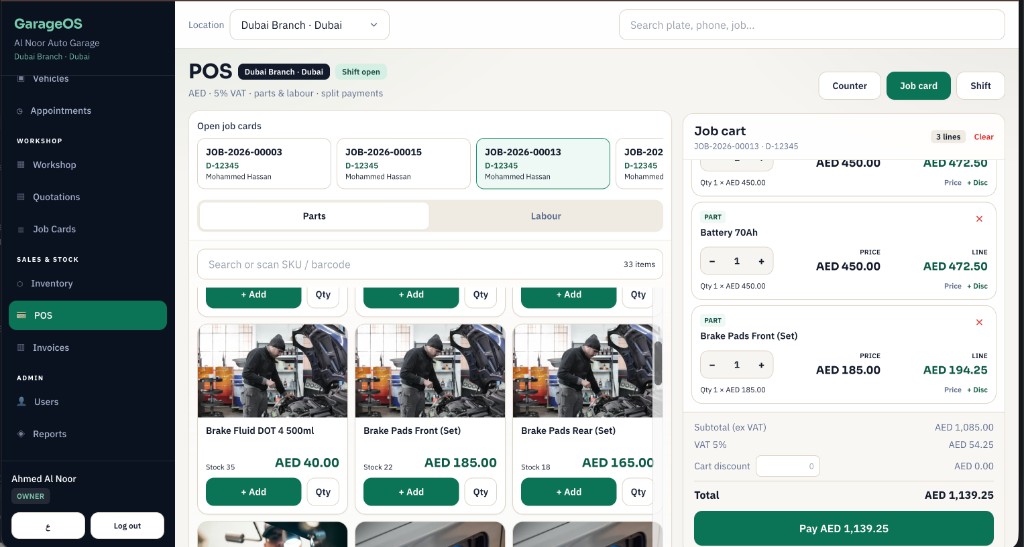
Search or scan: type a part name or SKU, or scan the barcode. Add parts and labor into one cart — on Professional, the cashier sees live stock before adding the part. Check the total: the system adds the sales tax rate you set and shows the final price. Record payment as cash, card, bank transfer, or online (GarageFlow records the method; it does not process card payments through a terminal). Print the invoice for the customer; on Professional, stock drops by the parts sold.
Once cashiers know the screen, a simple counter sale is usually finished in about a minute. For a deeper product walkthrough, open the garage counter POS feature page.
Job card mode: charge by plate number
Some work starts in the bay, not at the counter. A car comes in, the advisor writes the complaint, and the technician fixes it. When the work is done, the cashier needs the final bill.
In job checkout, the cashier opens the job by license plate. The customer, the car, and the labor lines are already there. Nobody types them again. The cashier adds any last parts, records payment, and prints the invoice. That handoff between the repair order and the till is what separates a garage POS from a walk-up-only till.
Features to look for
Parts and labor on one cart — one clear bill for the customer. Live stock count (on inventory plans) — no selling parts you do not have. Barcode and SKU search — fast, accurate lookups. Your own tax rate — correct tax for your state or country. Job card handoff by plate — no retyping between bay and counter. Invoice printing from the desk browser or printer you already use. Low-stock flags when you set a minimum on each part — reorder before the bay waits.
Compare those against big shop platforms (Tekmetric, Shopmonkey, AutoLeap) that bury POS inside a full suite, and against payment-first tools (Clover, SumUp) that are strong at taking cards but weaker at parts-plus-labor job handoff. Shop Boss and AutoFluent sit closer on price; your edge is a clear trial and a garage-specific cart.
Set the right sales tax and keep stock honest
Tax rules differ by state and country. Some places tax parts but not labor. A good system lets you set your own rate instead of forcing one. Check with your accountant for the rules where you work, and test one sale before going live. A wrong tax setting is easy to fix on day one and painful to fix after a year.
Every part sold at the counter should lower your stock count. When that happens on its own, you do not need to count the shelf each week. Over time you also learn which parts sell fastest and which sit on the shelf. In GarageFlow POS, inventory and stock deduct are on the Professional plan; Starter still runs jobs, estimates, and counter POS without stock control.
How to choose — and mistakes to avoid
Ask: Can my cashier learn it in one day? Does it sell parts and labor together? Does stock update by itself on the plan I need? Can I set my own tax rate and currency? Can I print an invoice from a computer or tablet I already own? Is there a free trial, and does it need a credit card?
Cloud systems for repair shops are usually billed monthly. Prices run from under $100 to several hundred dollars depending on features and staff — always confirm on the vendor’s own pricing page. GarageFlow Starter starts at USD 149/month after a 14-day free trial with no card. Do not skip the trial; always test with real parts and real customers. Enter stock before you judge inventory. Train every cashier and advisor, not only one person. Ignore receipt layout at your peril — customers read the invoice.
Start with a free trial, add ten of your best-selling parts, and run your counter on it for one day. Watch how fast your cashier can finish a sale and how clean the invoice looks. That test tells you more than any feature list. Next, read about digital job cards, inventory for garages, and invoice print if those are your next bottlenecks.
Frequently asked questions
- What is a garage counter POS?
- It is the software at your front desk that sells parts and labor, adds tax, records payment type, and prints the invoice. On inventory plans it also updates stock after each sale.
- What is the difference between a POS and shop management software?
- A POS handles the sale and payment record. Shop management software also tracks jobs, inspections, and bay status. GarageFlow POS combines counter checkout with repair orders so the job can flow into the sale.
- Can I use a regular POS for my auto repair shop?
- You can, but it will not link sales to a vehicle well, and it handles parts and labor poorly. A garage-focused system saves you from workarounds.
- Does a garage POS work with a barcode scanner?
- GarageFlow POS finds parts by SKU or barcode when the catalogue has those fields. Use a USB or keyboard-wedge scanner that types into the search box. Confirm your scanner on a trial before you buy hardware.
- How much does a garage POS cost?
- Cloud systems for repair shops are usually billed monthly. GarageFlow plans start at USD 149/month after a 14-day free trial with no card. Always confirm current prices on the pricing page.
- Do I need special hardware?
- Not always. A computer or tablet and a printer cover most counters. A barcode scanner is optional. GarageFlow records cash or card as the payment type; it does not include integrated card-terminal processing.
GarageFlow POS editorial covers garage counter workflows, repair orders, inventory, and invoices for independent auto repair shops. Content is checked against what GarageFlow POS ships today — including honest limits on payments, supplier catalogs, and accounting sync.
Counter POS, job cards, estimates, and invoices in your garage’s currency and tax rate.