What is a job card?
Job card software keeps every repair in one place, from the moment a car arrives to the moment it leaves. A job card lists the customer, the vehicle, the problem, the work done, the parts used, and the price. This guide explains what a job card is, why paper fails, and what to look for in a digital system.
A job card is the record of one repair. In the US, shops often call it a repair order or work order. In the UK and many other countries, it is a job card. The idea is the same. A good job card answers five questions: Who is the customer? Which car is it, and what is the plate number? What problem did the customer report? What work and parts will it take, and how much will it cost? What was actually done? When these answers live on one page, nobody has to guess.
Why paper job cards cause problems
Paper works until the shop gets busy. Then the trouble starts: cards get lost, stained, or left in a truck; handwriting is hard to read, so parts get ordered wrong; the front desk cannot see the status without walking to the bay; prices on the card and prices on the invoice do not match; old cards pile up, so finding a past repair takes forever.
Each of these costs you time, and some cost you money. A single lost card can mean work that never gets billed. That is why shops search for job card software, repair order software, or work order software for garages instead of another notepad.
What job card software does
Job card software moves that card onto a screen. Every person in the shop sees the same job at the same time. Check-in records the customer, the car, and the complaint in a minute. Inspection notes what the technician finds. An estimate builds a quote with parts and labor. Approval moves the job when the customer says yes before work starts. Repair logs work and parts used. Payment and handover finish the visit when the bill is settled and the keys go back.
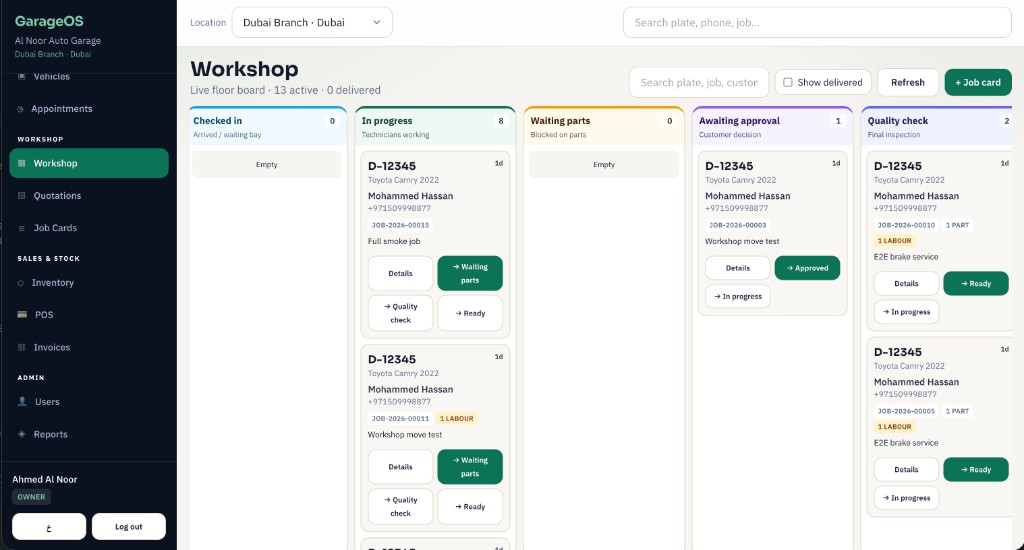
In GarageFlow POS the same flow sits on one repair order: checked in, waiting approval, in progress, waiting parts, quality check, and ready. Advisors, technicians, and cashiers open the same card. Because it all sits on one job, the total at the end matches what was approved — not a second notebook at the till.
Why get the estimate approved first
Surprise bills make customers angry. When the estimate is on the job card and the customer agrees, you have a clear record. If extra work comes up, you add it, ask again, and keep the record. This protects the customer and protects you.
GarageFlow POS carries approved estimate lines onto the job so the advisor does not rebuild the quote. Status waiting approval shows the desk which cars still need a yes before the bay starts.
How job cards connect to the counter
The best setup links the bay and the front desk. When the repair is done, the cashier opens the job by plate number. The customer, the car, and the labor lines are already filled in. The cashier adds any last parts, records payment type, and prints the invoice.
Nothing gets typed twice, so there are fewer mistakes. It also makes each sale faster, which matters when three customers are waiting. Read the garage counter POS guide for the till side of that handoff, and open the Job cards product page for the board itself.
How job cards help your stock
Parts used on a job should come out of your stock. If the job card and the stock list talk to each other, your shelf count stays honest. You see low parts sooner and avoid the “we thought we had one” problem. If the two do not connect, someone must update stock by hand, and that rarely happens on a busy day.
In GarageFlow POS, inventory and stock deduct are on the Professional plan. Starter still runs job cards, estimates, and Job POS without stock control — so pick the plan that matches whether stock honesty is your next bottleneck.
Features to look for — and questions before you buy
Search by plate number — find a car in seconds. Customer and vehicle history — see past repairs before you quote. Estimates with parts and labor — clear prices before work starts. Status tracking — know which jobs are waiting, active, or done. Link to invoice and payment — one job, one final bill. Stock link — parts used leave inventory on plans that include it. Staff roles — technicians see jobs; owners and managers see money and settings.
Ask: How long will it take my staff to learn it? Can I find an old job by plate number or customer name? Does the estimate turn into an invoice without retyping? Can I try it free, and do I need a credit card? Can I print a clean invoice for the customer? GarageFlow POS includes a 14-day free trial with no card. Try two or three real jobs before you decide. A system that looks great in a demo can feel slow when the shop is full.
Tips to roll it out smoothly
Start with one day of new jobs. Do not enter your whole history first. Use the same words for common jobs, like “oil change” or “brake pads front.” Take a photo of the dashboard or damage at check-in when photos help the dispute later — GarageFlow POS can attach photos to the job card. Check job status twice a day, once in the morning and once at close. Ask your technicians what slows them down, and fix that first.
Pick one car that comes in tomorrow. Write up the job card on a screen instead of paper, build the estimate, get approval, and finish with an invoice. If it felt easier than paper, you have your answer. Good job card software should save you time on the very first repair.
Frequently asked questions
- What is job card software?
- It is a program that records each repair job, including the customer, the car, the work, the parts, and the price. Everyone in the shop sees the same information.
- What is the difference between a job card and a repair order?
- Nothing important. Repair order and work order are common terms in the US. Job card is common in the UK and other countries.
- Is job card software only for big garages?
- No. A one-bay shop can benefit as much as a large one, because lost paperwork hurts small shops the most.
- Can job card software create estimates and invoices?
- Yes in GarageFlow POS. You build the estimate, the customer approves it, lines move onto the job, and Job POS turns that card into the final invoice without retyping.
- Can I look up a car’s past repairs?
- Yes. Jobs and invoices stay on the vehicle. Search by plate number to see history in seconds.
- How much does a system like this cost?
- Many cloud systems charge monthly, from under $100 to a few hundred dollars. GarageFlow plans start at USD 149/month after a 14-day free trial with no card. Always confirm on the pricing page.
GarageFlow POS editorial covers garage counter workflows, repair orders, inventory, and invoices for independent auto repair shops. Content is checked against what GarageFlow POS ships today — including honest limits on payments, supplier catalogs, and accounting sync.
Counter POS, job cards, estimates, and invoices in your garage’s currency and tax rate.